

gov-fr.directory.register) before the Peppol registration.
How it works
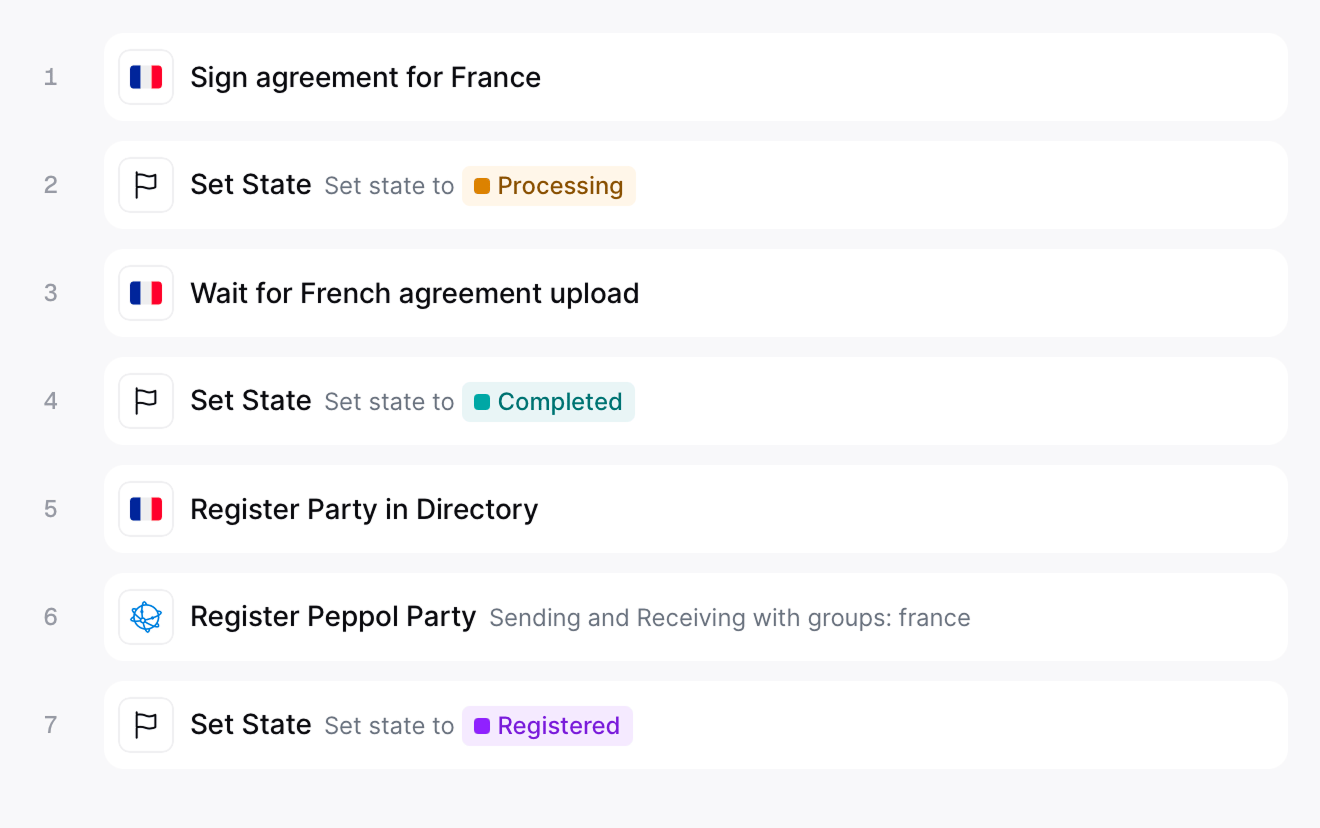
Sign agreement for France
gov-fr.agreement.sign).Set State → processing
Wait for French agreement upload
gov-fr.agreement.wait.approval). This is a manual gate — the party stays in processing and the workflow does not advance until someone opens the agreement form and signs it. See Complete the agreement below.Set State → completed
Register Party in Directory
gov-fr.directory.register).Register Peppol Party
france document group, enabling Peppol-level routing for sending and receiving.Set State → registered
- Template
- Code
France PA register party workflow
Complete the agreement
After the workflow reaches Wait for French agreement upload, the party sits in processing until the PA mandate is signed. This step is manual and required — the party cannot be accepted, registered in the Annuaire, or published on Peppol until it is done.Sign in Console
The agreement form is surfaced as a link on the party itself:Open the party entry
Go to the Meta tab
approval-link).Open and sign the agreement form
Sign through the API
You can also complete the agreement programmatically — useful when you embed the onboarding in your own product instead of sending the signer to the Invopop form. Once the workflow has paused at Wait for French agreement upload:-
Download the unsigned agreement PDF
GET /apps/gov-fr/v1/entry/{silo_entry_id}/agreement
The mandate PDF is generated from the party’s data for the signer to review and sign. -
Upload the signed agreement
POST /apps/gov-fr/v1/entry/{silo_entry_id}/agreement
Send the signed PDF together with the signature method:esignaturefor an electronic (PAdES) signature, oridentityfor a handwritten one. -
Upload identity images
POST /apps/gov-fr/v1/entry/{silo_entry_id}/identity
Only required when the signature method isidentity. Upload one image per view:frontandbackfor an ID card, orpagefor a passport. -
Confirm the submission
POST /apps/gov-fr/v1/entry/{silo_entry_id}/confirm
Marks the submission as complete and wakes the waiting workflow task.
Unregistration
Run the unregister workflow to revoke a party’s registrations when it should no longer issue or receive invoices through Invopop.Unregister Peppol Party
Unregister from Directory
Set State → void
- Template
- Code
France PA unregister party workflow
FAQ
How do I onboard a new supplier in France?
How do I onboard a new supplier in France?
How are supplier credentials stored in Invopop for France?
How are supplier credentials stored in Invopop for France?
How do I register a supplier with France PA?
How do I register a supplier with France PA?
What certificates does France PA require to authenticate a supplier?
What certificates does France PA require to authenticate a supplier?
How do I register for a Peppol inbox in Invopop?
How do I register for a Peppol inbox in Invopop?
ubl-invoice doc group) and ready to receive invoices.I get 'XXXX:XXXXXXXXX is already registered' when registering a supplier — what now?
I get 'XXXX:XXXXXXXXX is already registered' when registering a supplier — what now?
9925 VAT scheme rather than the default 0208).How do I assign multiple inboxes to a single supplier?
How do I assign multiple inboxes to a single supplier?
What are Participant IDs?
What are Participant IDs?
- Scheme — identifies the type of identifier (e.g.
9920for Spanish VAT,0208for Belgian KBO/BCE) - Code — the actual identification number
0208 but some entities are only registered under 9925 (VAT). If you hit a “receiver not found” error, the recipient may be registered under an alternative scheme.What visibility level should I set on my Peppol Party?
What visibility level should I set on my Peppol Party?
smp— SMP only, for testingsmp+sml— SMP and SML, useful when you only want to sendsmp+sml+peppol— SMP, SML, and the Peppol Directory, recommended for both sending and receiving (and for being discoverable in the Directory)
🇫🇷 Invopop resources for France
🇫🇷 Invopop resources for France
| Compliance | Invoicing compliance in France Compliance timeline |
| Apps | France Peppol ChorusPro France |
| Guides | ChorusPro Guide PA Guide — Registration · Invoicing · Status · Reporting |
| FAQ | France FAQ |
| GOBL | France Tax Regime Chorus Pro Addon French Factur-X Addon |
| GitHub | gobl.xinvoice |


